What are the levels of administrative access?
Determining the Type of Permissions
(there are no limits to the number of users in any category)
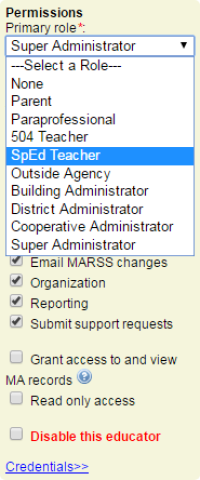
a. The “Super Administrator” has access to all menus for all students and administrative functions per extended permissions.
b. A “Cooperative Administrator” has access to all menus for all students in their cooperative and administrative functions per extended permissions.
c. A “District Administrator” has access to all menus for all students in their district and administrative functions per extended permissions.
d. A “Building Administrator” has access to all menus for all students in their school and administrative functions per extended permissions.
e. “Outside Agency” has access to the IIIP menus for students shared by case managers.
f. A “SpEd Teacher” has access to GenEd Forms menu for students in their district. Has access to SpEd and MA menus for students shared by case managers.
g. A “GenEd Teacher” has access to the GenEd Forms menu for students in their district.
h. A “Paraprofessional” has access to the MA Forms menu for students shared.
i. A “Parent” has access to finalized forms for students shared by case managers.
j. An account with “None” for a primary role has access to GenEd Forms menu for students in their district. Has access to SpEd and MA menus for students shared by case managers.
Administration menus may appear different depending on the user's level of access. All administrators are able to toggle between their MAIN MENU and the ADMINISTRATION MENU by using the “Go To…” drop down list.
Extended permissions for Administrators include:
- Allow grade rollover
- Delete student records
- District contact
- District contact (tuition agreements)
- Edit MARSS records
- Educators (Access to search/view/modify user accounts)
- Email MARSS changes (User would receive an email at after each finalized Prior Written Notice).
- Hide in provider list (User not shown in Service Provider drop down menus)
- Organization (Access to District, School Setup, Admin Preferences)
- Read only SpEd (Can view only, not edit any SpEd Forms)
- Reporting (Access to Administrative Reports)
- Submit support requests (May submit Support Requests directly to SpEd Forms)
- Disable this educator
Extended permissions for Educators include:
- Add new students
- Edit MARSS records
- Hide “Intervention groups”
- Hide “MA Billing Setup”
- Hide “Student Setup”
- Hide “Student Sharing”
- MA activity/trip log finalization
- “MA eligible” filter
- SpEd service plan finalization