How do I add new students?
Give special attention to saving, printing and navigation instructions:
- Always click the “Save” button after information is entered or changes are made.
- Always use the SpEd Forms “Print” button, instead of selecting “Print” in the “File” menu.
- Always use the SpEd Forms “Back” button rather than the browser's “Back” feature.
- Only case managers or others assigned the correct authority by your SpEd Forms administrator may create new student records.
If this screen does not have the “Add New Student” button, you are not set up as an IEP Manager or you have not been given permission in your Educator Setup to create new student records. Contact your SpEd Forms administrator if your feel your status needs to be changed.
To add a new student:
- Navigate to the teacher's “Main Menu” by clicking in the drop down “Go to… Educator Menu”.
- Click on “Students”.
- You will then see a list of all your students (shown with a pink background) and students that other IEP managers have shared with you (shown with an ivory background).
- Click the “Add new student” button to add a student.
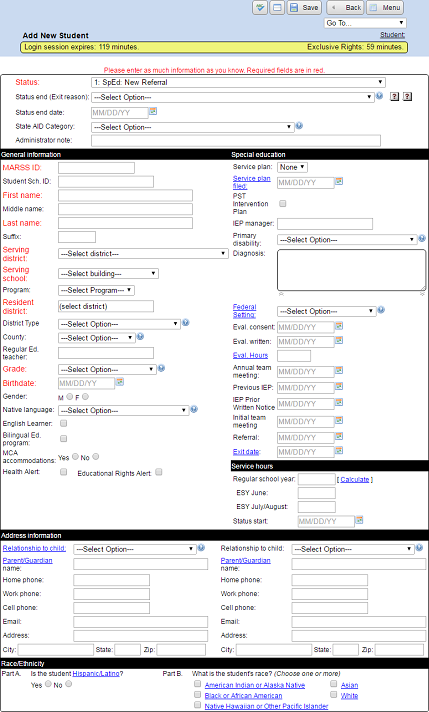
- Fill in any known information on the setup page. Items in Red are required.
- Click the “Save” button.
- The student will now be added to your list.
- You can click on any of the drop down boxes to see a list of choices.
- Click on any link to get a more detailed description.
- The link for “Federal Setting” will show a list of settings and descriptions for various ages. You will need to close this new window and choose the setting number from the choices in the drop down list box.
- You can click on a Calendar icon to choose any date instead of typing one.
Items in Red like Status, Student / MARSS ID, First Name, Last Name and Serving District are required.
We also validate the required fields for saving. This is shown during save as green borders around important fields. It checks for proper date format, required fields are filled in and that there are no invalid characters.