How do I replace or void an individual claim?
You should use the Replace feature if the date or service needs to be corrected for one or more students. Reasons to use the Void feature may include claims that have to be returned because the service was not billable, the wrong student was billed, or the wrong district was billed. You also must have the “CLM #” from your Remittance Advice or have imported the 835 X12 to utilize either option.
For claims that are to be Voided, once the error is discovered, do not make any changes to the claims, student or activity logs before sending a void in a batch file. You will have to wait until you receive the next Remittance Advice and verify that the incorrect claims have been voided before fixing the errors and resubmitting under the correct student or district if necessary.
To replace or void individual claims:
If you use the Replace feature, changes must be made first. Click the blue “Line ID” link to be brought to the “Edit claim” page. Make changes to the type or date of service, click “Save” and then “Back” to get back to your search list.
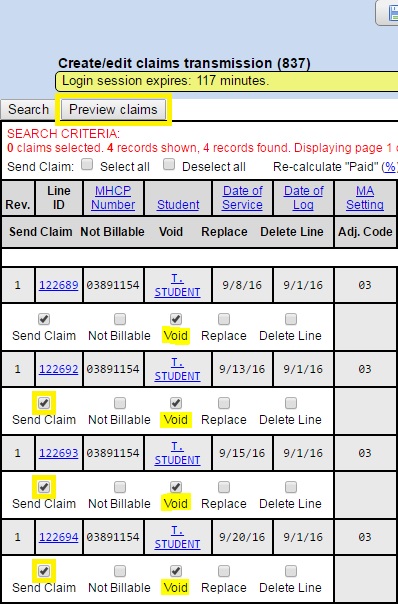
- From the MA Reports menu, click “Create/edit claim transmission (837)”.
- Search for the claim(s) that need to be replaced or voided.
- Select both the “Send Claim” and the “Replace” OR “Void” for each claim that needs to be corrected or returned.
- Click “Preview selected claims” to review the claims to be replaced or returned.
- Click “Process claims”.
- Click on the “Click here to download…” link, then save the (.txt) file to the folder you have reserved for MA Batch Files.