Table of Contents
How do I create an MA activity log?
Working with activity logs
HINT: The activity log menu shows no more than 20 logs by default. You can change this number and then press “Enter”, but it will default back to 20 the next time you login.
- Navigate to the MA Forms menu.
- Click the “Activity Logs” link.
Create a new activity log
- Navigate to the MA Forms menu.
- Click the “Activity Logs” link.
- On the activity log menu, click the “New Activity Log” button.
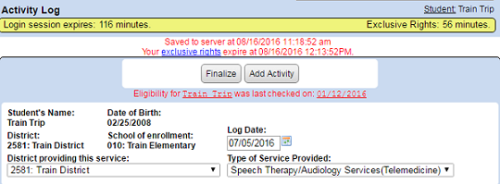
- You are then taken to a new IEP/IFSP services activity log sheet.
- Select the “Type of Service provided” and then click on the “Add Activity” button.
- Change the “Date of Service” to the actual date the service was provided and fill in the time spent, the number of children that were in the group, and type in a description or choose one from the descriptions drop down list.
- To add a Goal or Objectives to the description box, place your cursor in the box and then click on Goal and Objectives (top right side above Activity Log) and then click on insert next to the ones you would like to insert.
- Click on “Save” when you are finished. The log will show up on the activity logs menu.
- Fill in your name and title or the name and title of the person providing the service.
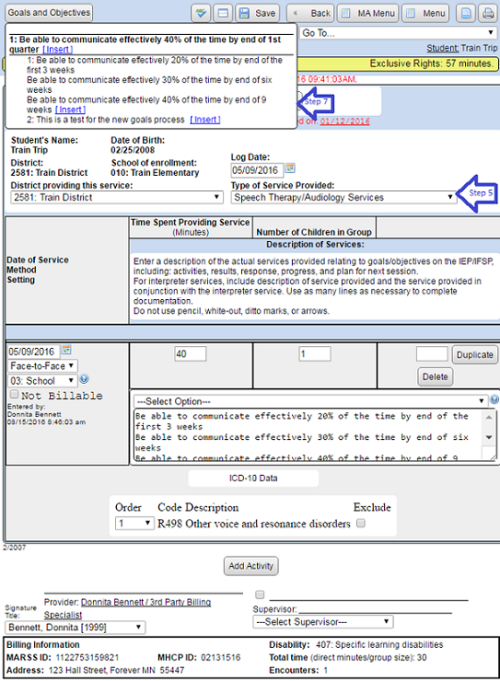
- You can duplicate any number of activity lines by typing in a number in the “Duplicate for (number of days)” box and clicking on the “Duplicate” button (if this box is left blank only one log will be duplicated). You can delete activity lines at any time before they are billed by clicking on the “Delete” button next to the log you want to delete.
- Use the “Finalize” button at the top of the page to render the log as finalized or completed. Your district may take this into account when building a batch of (only) “Completed” claims. If you need to make changes to the finalized log, click the “Reactivate log” button to reactivate it.