Measuring goals
The progress of each goal or objective can be followed in detail using preset measures. You can keep track of the student's progress by recording the results of each encounter.
If there are no measures in the list, you can add them using your personal measures bank.
- Start by going to any goal page of a service plan.
- Find an objective and click the “Measure Objective” link next to it.
- On the “Measure” page, select a measure from the drop down box, enter a score and the date the objective is expected to be achieved.
- Come back to this page as necessary and add results by entering the date, time and score for each achievement, clicking the “Add” button for each entry.
- Click the “Save” button to save your changes.
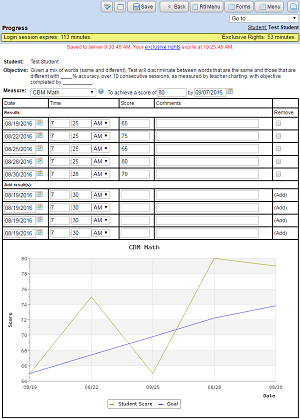
When enough “Results” have been entered for a measure, a graph can be created to get a detailed visual representation of the student's progress through the goal or objective.
Extended School Year Progress Report
The ESY Progress Report is an upgraded version of the original Progress Report, but the basic functions are still the same.
In order to write an ESY Progress Report, an ESY Form must be finalized after 4/7/2018 with Minutes and/or Sessions for each goal being reported on.
Measure Goal is more responsive, hopefully more intuitive, and requires less clicking to get a graph going. The graph itself has also been upgraded to include a trend line comprised of previous data collected, a flat goal line indicating the target, and a target line measuring a direct line between start and goal, and marking the difference against actual progress.
Each set of data can also be turned off to see only the data required. Data added is measured in real time, and the graph will update automatically.
Printing includes the same graphing data, and fields can be turned on or off, and the time scope adjusted before printing.
The layout and function of the progress reporting page remains the same.
