Table of Contents
How do re-activate an "Exited" student?
To reactivate an "Inactive" exited student:
- Educators: Locate students from your “Main Menu” by clicking “Students”, or use the “Go to…” drop down menu and select “Students - SpEd”.
- When your student caseload list appears, make sure there is a check in the “Inactive” checkbox at the top of the page.
- Click the blue “Activate” link next to the student's name.
- Clicking “Activate” will clear the “Status end (Exit reason)” and set the “Status” to “4: Receiving special education services”. If you need to change the status to something other than “4”, go to the “Student Setup” and proceed with the instructions below.
- Administrators: Locate students from your “Administration Menu” by clicking “Students”, or use the “Go to…” drop down menu and select “Admin Students”. Search to find the student's record you would like to activate. Be sure to place a checkmark in the “Inactive” box in the search criteria.
- “Inactive” students will have a grey face to the left of their name. “Active” students will have a green smile face by their name.
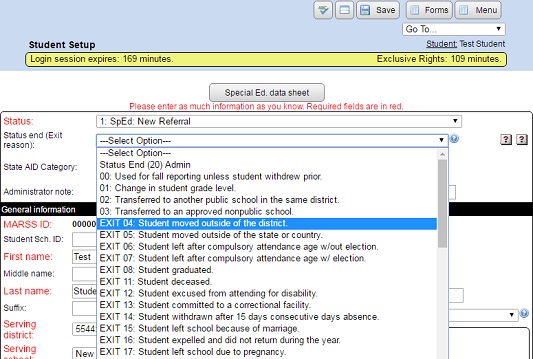
- Make sure the “Status” AND “Status End (Exit Reason)” do NOT have an “EXIT” or “GenEd” value. You can choose “–Clear–” (all the way at the bottom of the list) for the “Status end (Exit reason)” to clear the current setting.
Changing the status from the "Student Setup" screen:
- From the “Main Menu” click on “Students”.
- Make sure there is a grey smiley in the “Status” column.
- Click on the student's name to go the student's menu, or their ID to go directly to their setup.
- On the “Form Menu” click the “Student Setup” button.
- Select a new “Status” from the drop down list.
- Clear or choose a new setting for the “Status end (Exit reason)” drop down list.
- Click the “Save” button to save your changes.