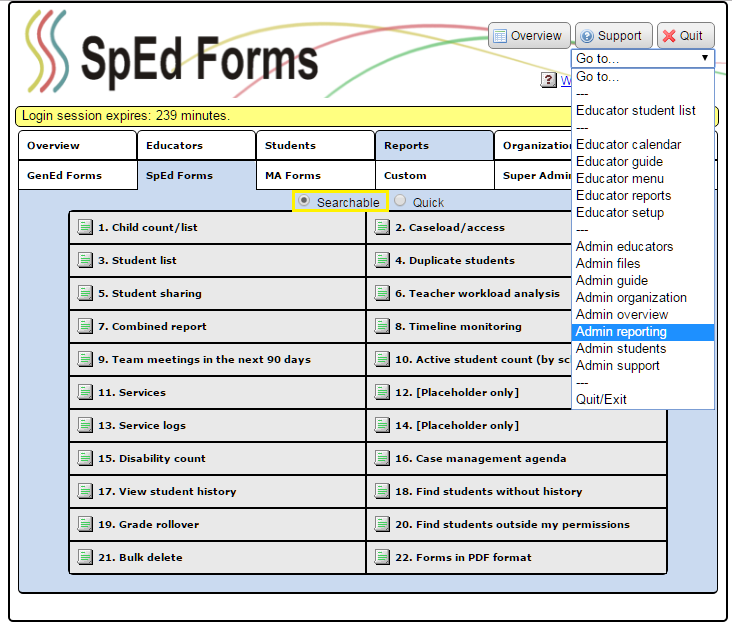
How do I use the "Child Count" report?
- From your “Administration Menu” click “Reports”, or use the “Go to…” drop down menu and select “Admin Reporting”.
- When the Reports menu appears, there are two selections at the top, “Searchable” and “Quick”. This report is a “Searchable” report.
- Click “Child count/list” to run this report.
- Enter your search criteria.
- Click “Search”.
If the reports are sorted by “IEP Manager” then page breaks will be inserted between every team member when printed.
The “Child count/list Report” will give you the following results:
- Student Name (Last/First)
- Student ID (MARSS #)
- Student's Date of Birth
- Grade Level
- Providing (Serving) District Number
- Resident District Number
- Primary Disability
- Secondary Disability
- Federal Child Count Setting Code
- IEP Meeting Date
- IEP Managager Name (Last/First)
- Services Start Date
- Services End Date
- MARSS Transportation Code
- You may use the “1st Order”, “2nd Order” and “3rd Order” drop down menus to sort your report by specific fields.
- To save the report as a csv file for use in a spreadsheet such as Excel, click [Save to File] at the top of the report.